Free iPhone & Android No account
Your rig’s logbook.
Every trip. Every fix. Every night.
Roam Logbook records your trips, reads your vehicle as you drive, keeps its service history and finds you a place for tonight. Export your data to AI and ask it anything about your rig. For vans, truck campers, RVs and overlanders, and it all stays on your phone.
Reads your vehicle through an OBDLink CX adapter.Get one on Amazon
Made for life on the road
For anyone who lives or travels in a rig
Van lifers, truck campers, RV travellers and overlanders. Tell the setup what you drive and the app fits itself to it: the words it uses, the parts of the rig the Log keeps apart, the dashboards it starts with.
Van
Fuel, fixes, water, dump, and every night out.
Truck & camper
The truck and the camper, each with its own entries in the Log.
RV
The engine, the house batteries and the places you stay.
Overland truck
Grade, engine health and every mile of the trail.
Features
Five tabs. Your whole rig.
Dashboard, Trips, Places, Log and Settings: the road, the rig and the nights out, in one app that works with no signal.
Trips
Every drive recorded with the phone’s GPS and whatever your vehicle reports. With the adapter, it starts by itself.
Dashboards
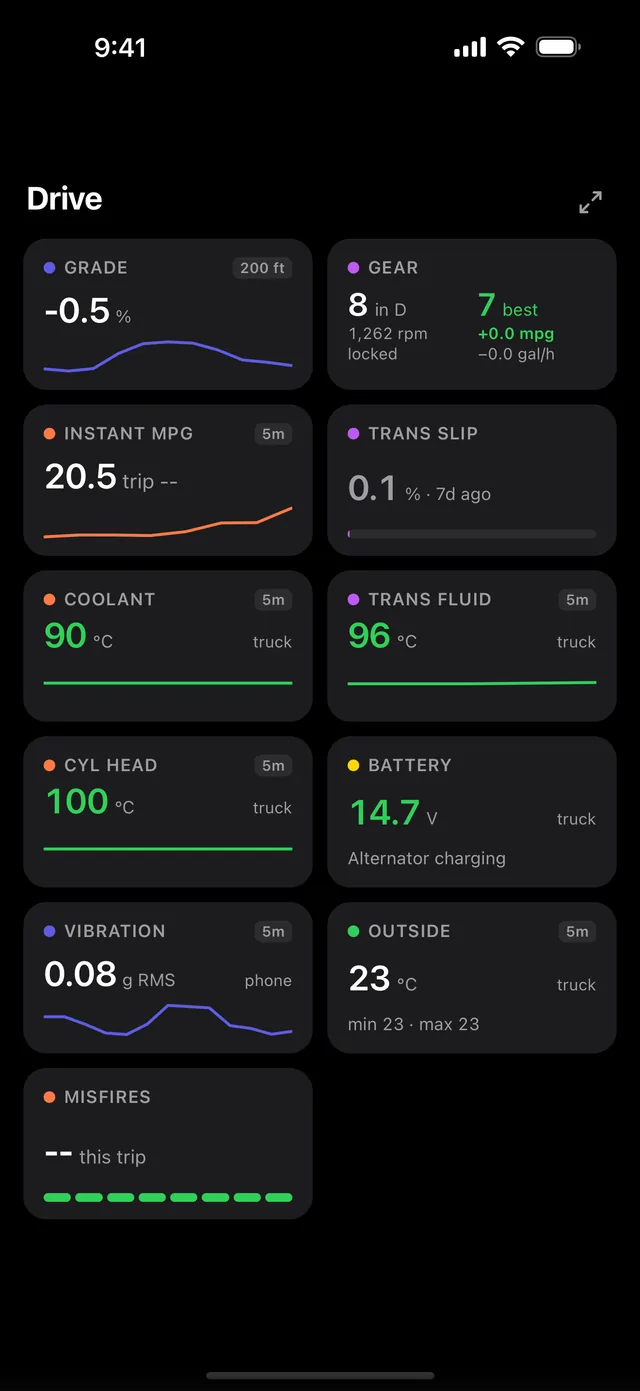
Live and made your own: Drive, Tow & Grade, Engine Health, Camp.
Export to AI
Hand your data to the AI you use and ask it anything about your rig: every reading, and notes on how to read them.
The Log
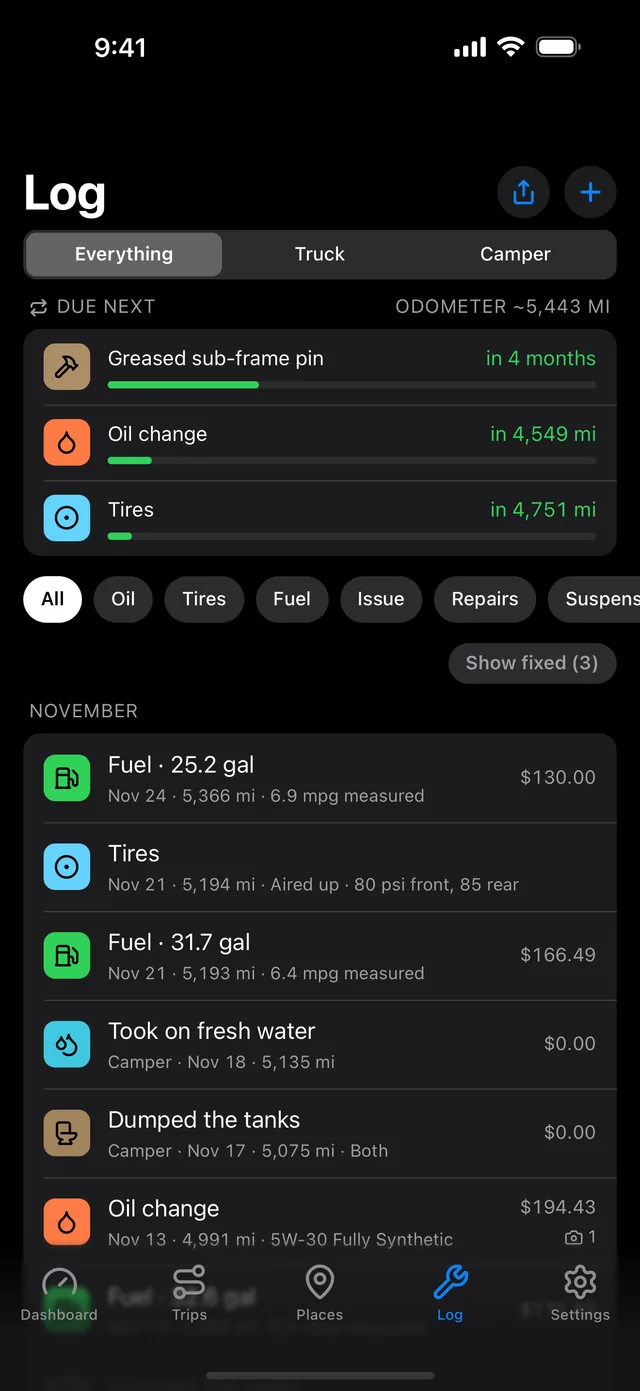
Oil, tires, fuel, repairs, issues, water and dump, with photos, receipts and a PDF.
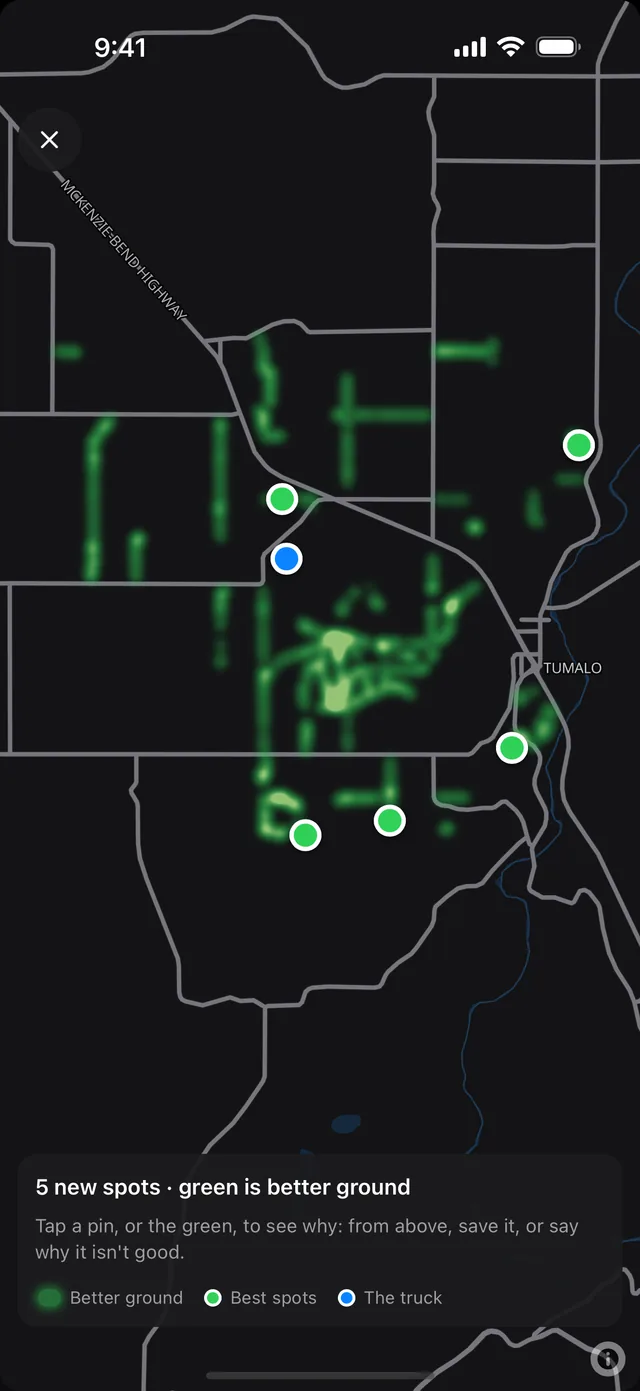
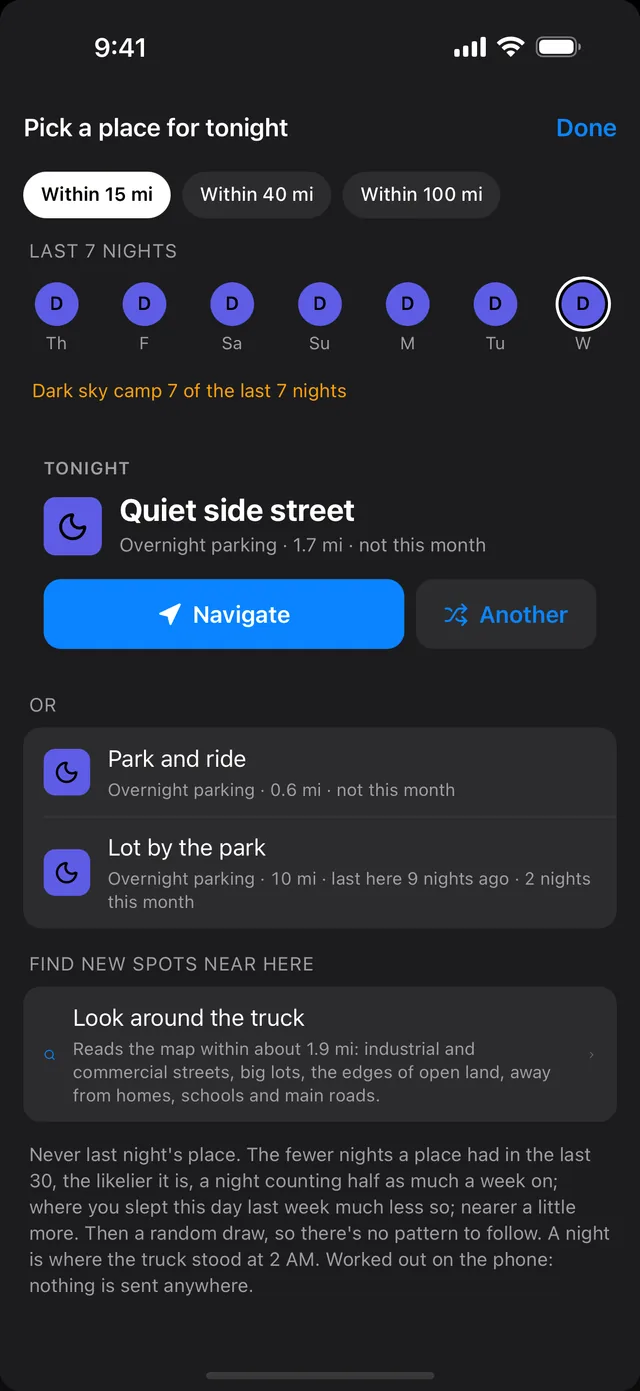
Where to stay tonight
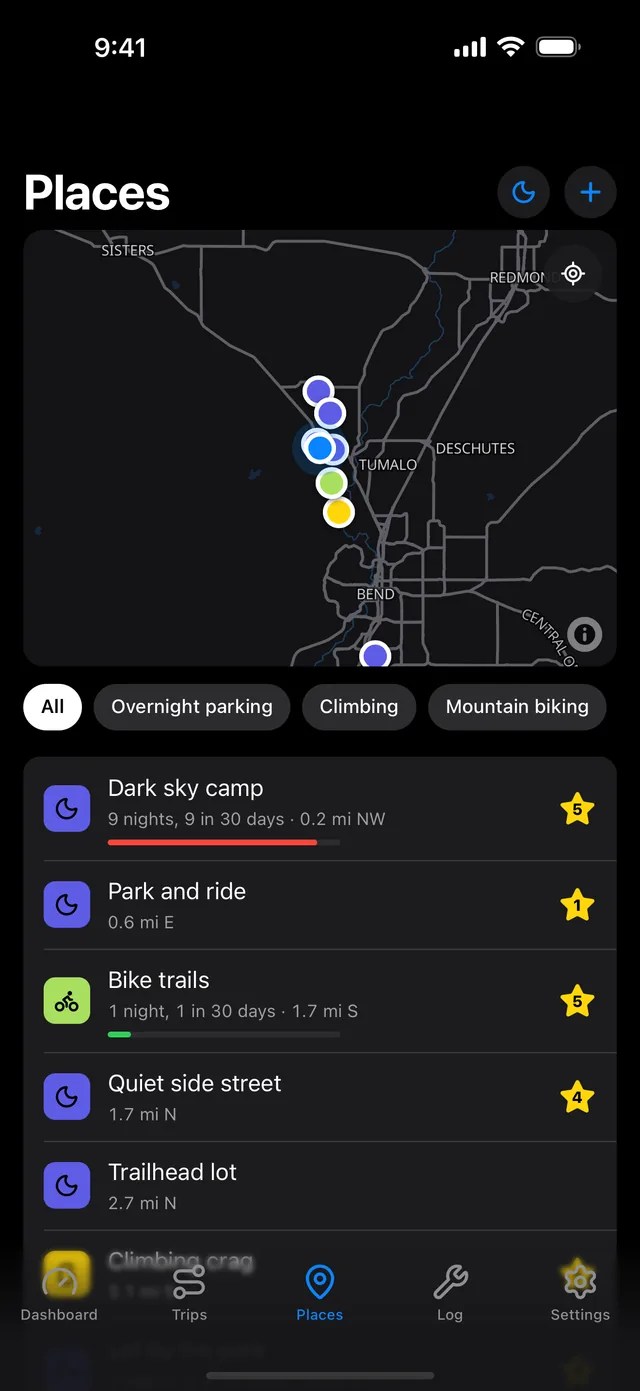
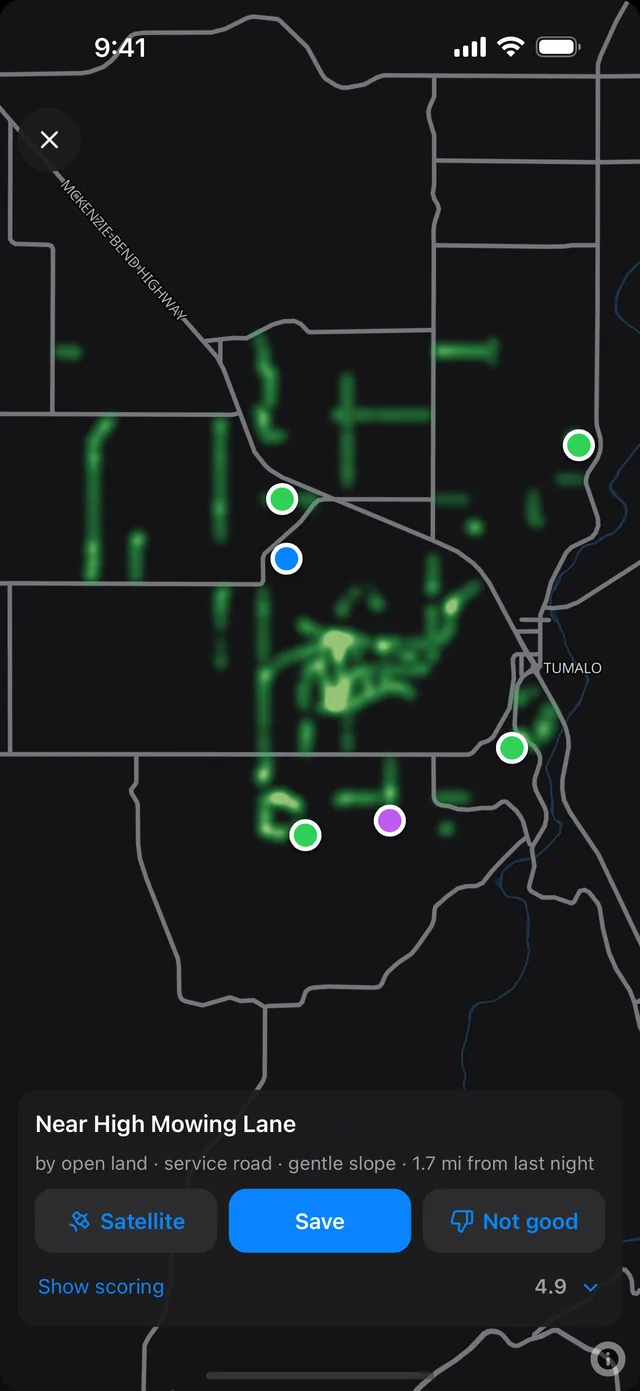
Tonight’s pick from your own spots, never last night’s, and new spots near you: worked out on your phone, and it learns from you.
Your spots
Camps, overnight parking, water, dump and the places you surf, climb or ride, with the nights spent at each.
Insights
What the rig cost, how far it went, and where you spent your time.
Catch it early
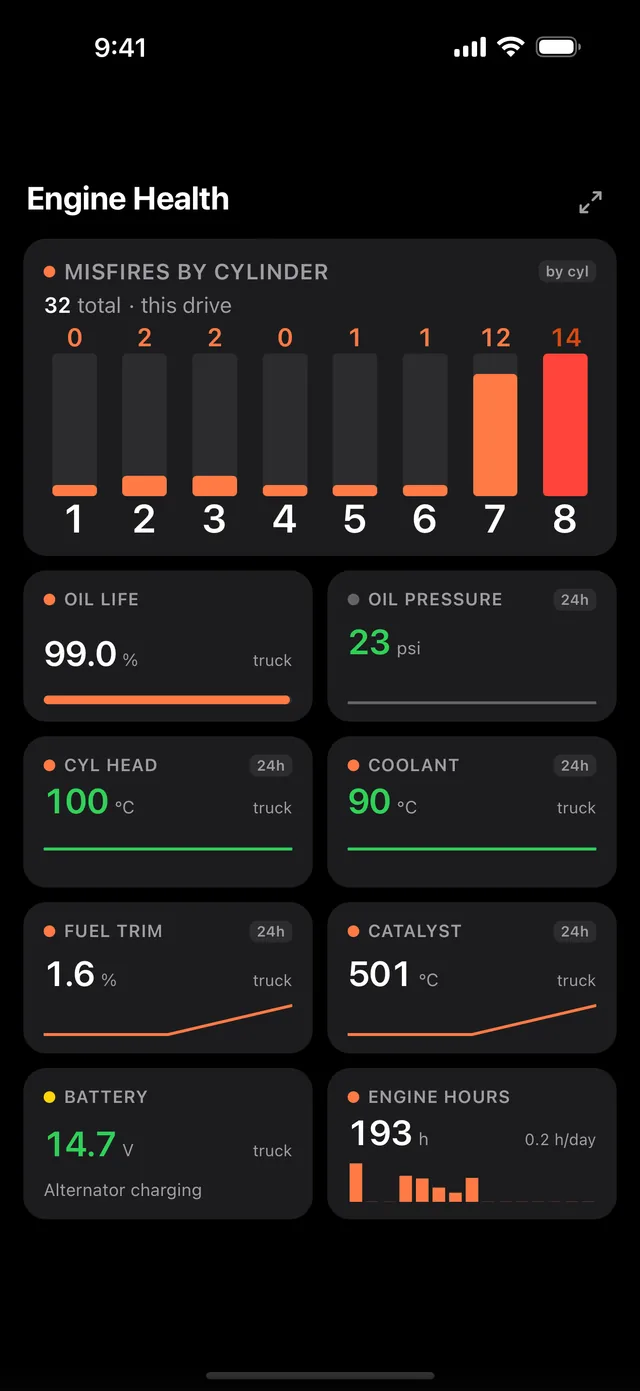
Misfires by cylinder, oil pressure, fuel trims and temperatures, and an alarm when one turns red.
Trips
Every trip, every reading
Each drive is recorded with your phone’s GPS, barometer and motion sensors, and with everything your vehicle and your Bluetooth devices report on the way. Every connected reading is logged on every trip, whatever your dashboards show.
- Your vehicle, through an OBDLink CX adapter: speed, engine, transmission, fuel, temperatures and more.
- Your rig’s devices: RuuviTag, Govee and BTHome thermometers, Victron battery monitors and chargers, and the Liquid Spring suspension display.
- Starts by itself when the engine starts (with the adapter), and a stop for fuel stays part of the same trip.
- Replay any trip on your dashboards, and look back day by day on the Timeline.
- Take it anywhere: export a trip with every reading and the raw data from the vehicle.
Listen-only. The app reads from your vehicle and never writes to it.
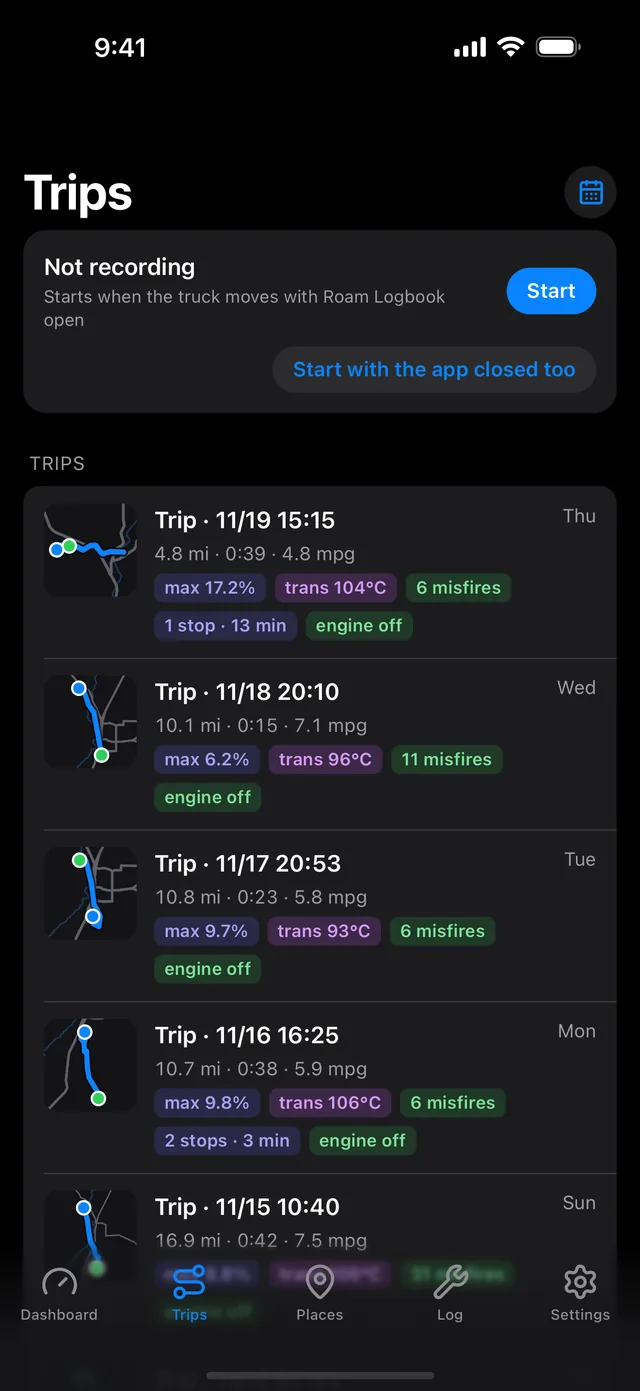
Export to AI
Export your data to AI. Ask it about your rig.
Share any trip for AI analysis with the assistant you already use, like ChatGPT, Claude or Gemini, and ask what you want to know about your truck, van or RV. It gets every reading of the drive and the notes it needs to read them right.
- Find what’s wrong: misfires by cylinder, fuel trims, oil pressure, lugging, a transmission running hot, with the whole drive in front of it.
- Learn how your rig drives: what a climb or a trailer costs in fuel, how hard the engine works, which gears it holds.
- Every reading of the trip, once a second, with the full data and the route, in one share.
- Notes so it reads them right: the trip says which readings are easy to misread, like the brake pedal, drive or manual, and the lean in a turn.
- Back it up for the mechanic: the issue in the Log with its updates, the readings it names, and a PDF with the receipts.
Your call, every time. The app sends nothing to an AI by itself: you share the trip, with the AI you pick.
Dashboards
Live dashboards, made your own
Swipe between Drive, Tow & Grade, Engine Health, Camp and Insights, or build your own. Add any reading, size it, and set the zones that turn it yellow or red.
- Zones and sparklines: each number takes its zone’s colour, with its line over the last 5 or 30 minutes, 24 hours, the trip or every trip.
- Hold a widget to see that reading over days, weeks or months.
- Engine Health: misfires by cylinder, oil life, coolant, fuel trims and the battery.
- The road’s grade from the phone’s barometer and GPS, on any vehicle.
- Camp: the house battery, the alternator’s charge, the fridge and the cabin, from your sensors.
- Alarms when a reading turns red on the road, also with the app in the background.
Deepest on Ford’s 7.3 L gas Super Duty (2020 and later): the gear to pick before a climb on a road you’ve driven, a warning when the engine lugs, and the true oil pressure. Other vehicles read the standard OBD-II set, plus their model’s own codes when the open OBDb library has them.
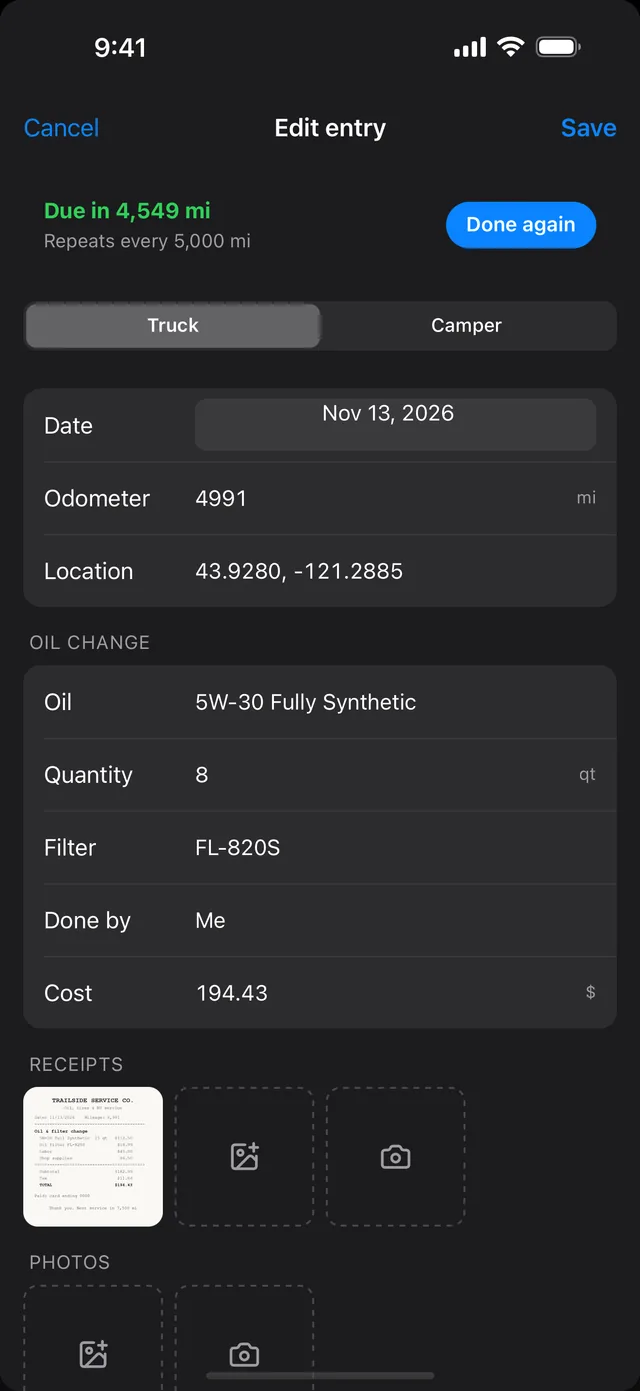
The Log
The rig’s whole history, in your pocket
Write down what you do to the rig as you do it. The odometer is filled in from the vehicle or your trips, and every entry keeps its date, place, cost and notes.
- Oil, tires, fuel, repairs, suspension, maintenance, fresh water and dump, each with its own fields, like front and rear tire pressures.
- Fuel without the math: type any two of gallons, price and total, and it works out the third.
- Issues with their updates (Open, Watching, Fixed) and the readings to keep an eye on.
- Due next: the jobs that repeat every so many miles or months, the most due first.
- Photos and receipts on every entry.
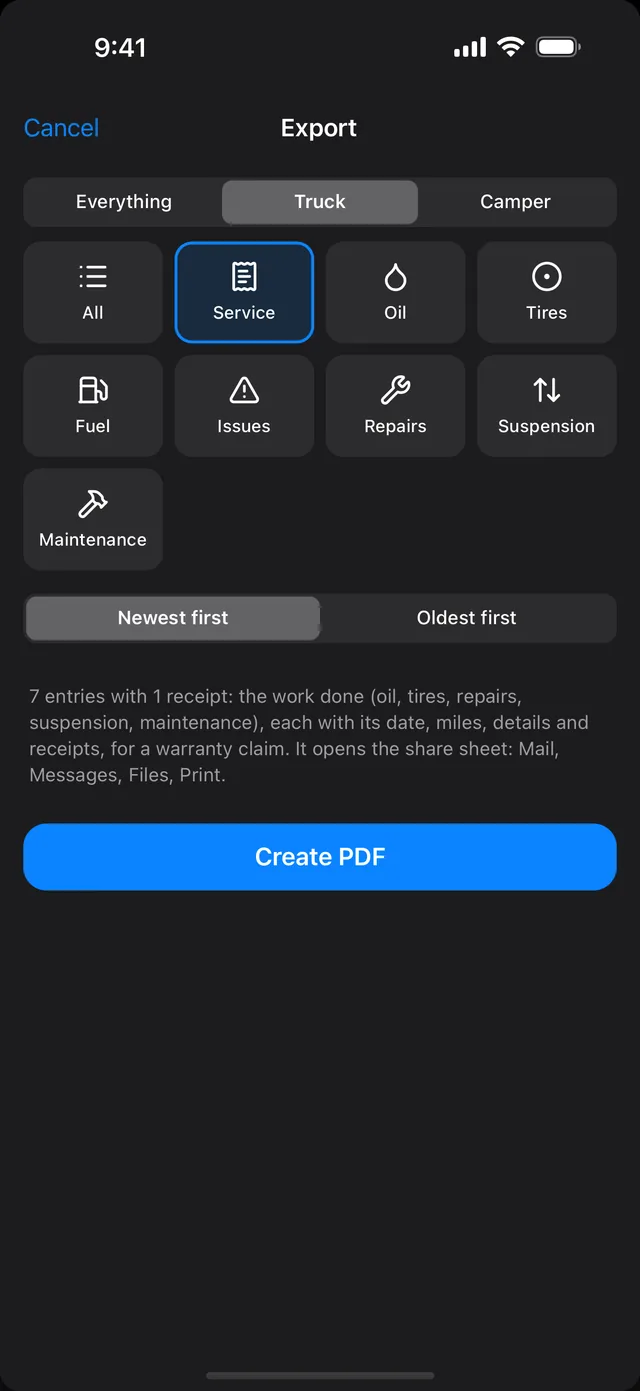
- A PDF to send: any list, or a Service record with its receipts for a warranty claim.
Where to stay
Find your place to stay
Save the spots that matter: camps, overnight parking, water, dump, fuel, propane, views, and where you surf, climb or ride. Each one counts the nights you’ve spent there.
- Want to go: the places you’ve saved but haven’t slept at yet.
- Tonight’s place, picked from your own camp and overnight spots within your range, and never last night’s, so you don’t fall into a pattern.
- New spots near you, found in the map’s own data: away from houses, busy roads and businesses’ lots, near open land, on gentle ground.
- It learns from you: say why a spot is no good, and the next look weighs things your way.
- All on your phone: worked out from the maps it keeps, with nothing sent anywhere, so it works with no signal.
- Search an address to pin a new place.
Worked out on your phone, with nothing sent anywhere. It can’t know local rules, signs or the night’s traffic: check them where you stop.
Insights
Where the money, the miles and the nights went
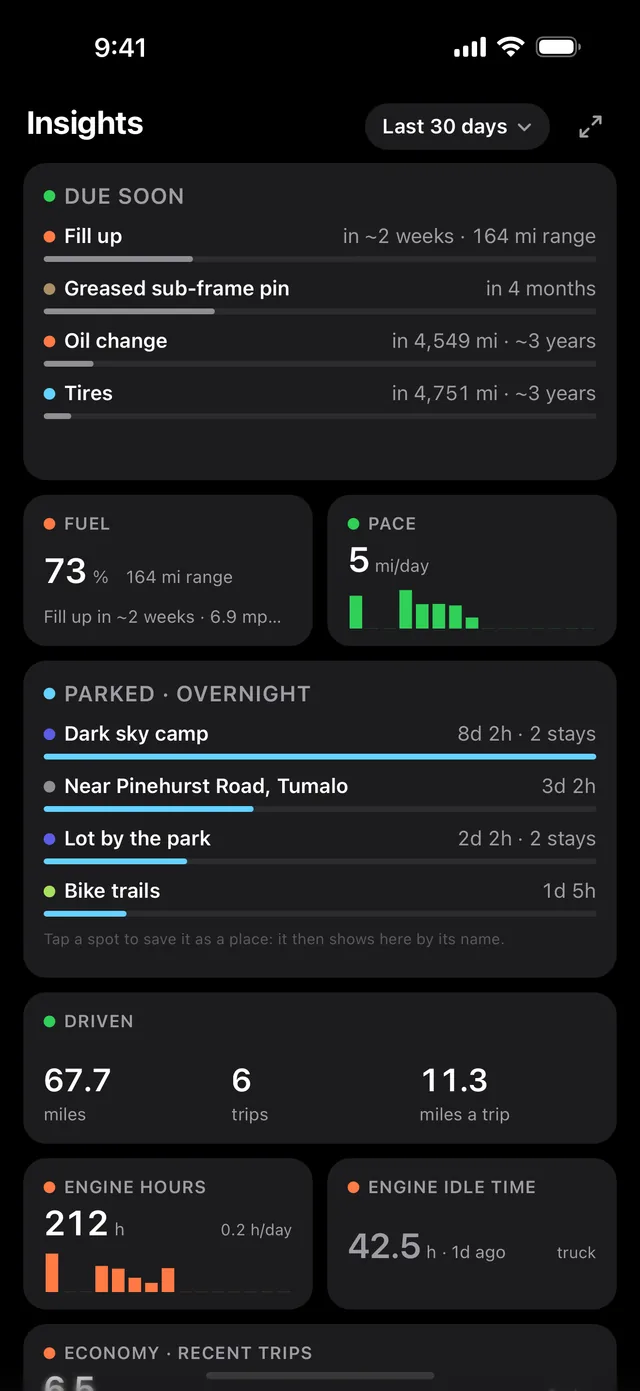
One period for the whole dashboard: this week, this month, the last 30 or 90 days, this year, all of it, or any two days.
- Costs from the Log, by type, with every entry behind them.
- Distance, pace and engine hours, and the fuel economy of recent trips.
- Fuel: what’s left, and when to fill up next.
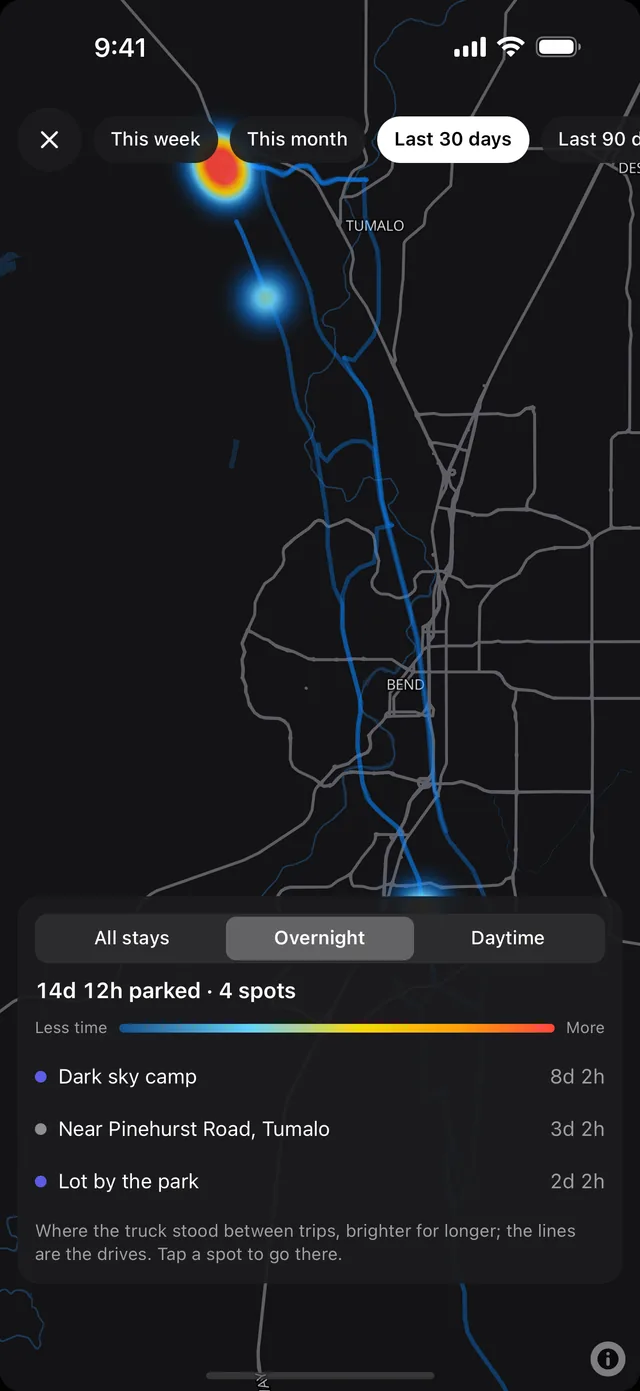
- Parked: the longest stays, overnight or daytime, named by your places or the street.
- Time spent: a heatmap of where the rig stood between trips.
- Due soon: jobs coming due, the next fill-up, and documents about to expire.
How it works
Plug in. Drive. It logs.
No account to make and nothing to pair. Set it up once, and it keeps the logbook while you drive.
Plug in the adapter
An OBDLink CX goes into the OBD-II port under the dash: the one adapter the app is built around.
Get the OBDLink CX on AmazonDrive
With the ignition on, the app finds the adapter and listens: nothing to pair. A trip starts with the engine, even with the app closed.
It logs
Every reading of every trip, kept on your phone and backed up to your folder when the trip ends. Add the fuel, the oil change and tonight’s spot as you go.
What you need
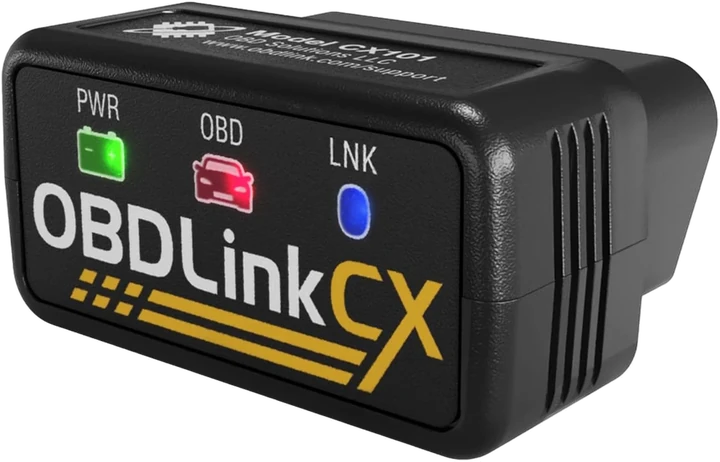
An OBDLink CX, to read your vehicle
A small Bluetooth adapter that plugs into the OBD-II port under the dash: the one Roam Logbook is built around. With the ignition on, the app finds it and listens. There’s nothing to pair.
Buy it on Amazon- An iPhone or an Android phone: iOS 15 or later, Android 10 or later.
- If you like, Bluetooth sensors for the rest of the rig: RuuviTag, Govee and BTHome thermometers, Victron battery monitors and chargers.
No adapter yet? The phone alone records your trips with its GPS, and the Log, Places and Insights all work.
The app
Made for a phone on the dash
Dark and quiet, with big numbers you read at a glance and taps that land on a bumpy road.
Privacy
Your logbook stays on your phone
We run no server that receives your data. It leaves your phone only when you send it somewhere yourself: an export, a backup, or your own server.
No account
Open it and go. There’s nothing to sign up for, and no ads, analytics or tracking.
Stays on your phone
Trips, the Log, photos and places are stored inside the app. We never receive them and can’t see them.
Your own backups
To a folder you choose: iCloud Drive or anywhere the Files app reaches on an iPhone, any folder you pick on Android.
Your own server, if you like
Sync trips to a PostgreSQL database you run. Its password stays in the phone’s secure storage.
Works offline
OpenStreetMap maps are kept on the phone as you go, and you can download an area before you lose signal.
Listen-only
The app reads from your vehicle and its devices. It never writes to them.
iPhone & Android
One app, on both phones
Whichever phone rides on your dash, Roam Logbook has the same screens, the same features and the same logbook.
- iPhone with iOS 15 or later.
- Android 10 or later.
- The same screens and features on both, built as one app.
- Backups made the same way, restored with the app’s own Restore.
- Scan the VIN on the door label with the camera: the barcode is read on the phone.

Who built it
“I built Roam Logbook because I needed a way to look after my truck and camper: to keep a record of everything, keep the maintenance up to date, and catch problems before they happen. And because I’m a total geek.”
Is Roam Logbook free?
Yes. There’s no account to make, and there are no ads.
What’s the catch?
There’s no catch. Nothing to buy, no ads, no account, and what you record stays on your phone. It was built by one person for his own truck and camper. Read about who built it.
Which adapter do I need to read my vehicle?
An OBDLink CX (on Amazon): a small Bluetooth adapter that plugs into your vehicle’s OBD-II port, usually under the dash on the driver’s side. With the ignition on, the app finds it and listens: there’s nothing to pair. No adapter? The app still records your trips with the phone’s GPS, barometer and motion sensors, and the Log, Places and Insights all work.
Which phones does it run on?
iPhone with iOS 15 or later, and Android 10 or later. Both phones get the same screens and the same features, and their backups are made the same way.
Where is my data kept?
On your phone, inside the app. There’s no account, and we run no server that receives your data: we never see it. It leaves your phone only when you export it, back it up or sync it yourself. The privacy policy lists the few things the app asks of the internet.
Which vehicles can it read?
Vehicles that answer OBD-II over CAN, which is most cars, trucks and vans sold in the US from 2008 on. Every one of them gives the standard readings: speed, engine speed, coolant, fuel trims, misfires by cylinder where the engine reports them, and more. When your VIN names a model the open OBDb library has (the Ford Transit and E-Series, the Chevrolet Express, Ram 1500 to 3500, Ford F-150 to F-350, Toyota and GM trucks among them), the app reads that model’s own codes too, with OBDb’s credit. Nobody picks a model: the VIN decides. Ford’s 7.3 L gas Super Duty (2020 and later) gets the most, including gear advice before a climb and the true oil pressure.
Can I export my data to AI?
Yes, to the AI you already use (ChatGPT, Claude, Gemini or another). On a trip, Share for AI analysis hands it every reading of the drive, once a second, with the full data and the route, and a README that tells it which readings are easy to misread. Ask it anything about your vehicle: why it misfired, why the transmission ran hot, what a climb or a trailer costs in fuel. The app sends nothing to an AI by itself: you choose what to share, and with whom.

Free. Ready for the road.
Roam Logbook for iPhone and Android. No account, no ads: download it, plug in the adapter, and drive.